

Screen, audio and vehicle-interface diagnosis in Dubai
Range Rover Infotainment Repair in Dubai
A blank screen, frozen menu, lost audio, Bluetooth failure, repeated reboot or camera display problem can begin in the screen, power supply, amplifier, network, software, USB hardware or another module. We identify the affected function and communication path before replacing the main unit.
Start with the failed function
Infotainment repair is not the same as replacing the display
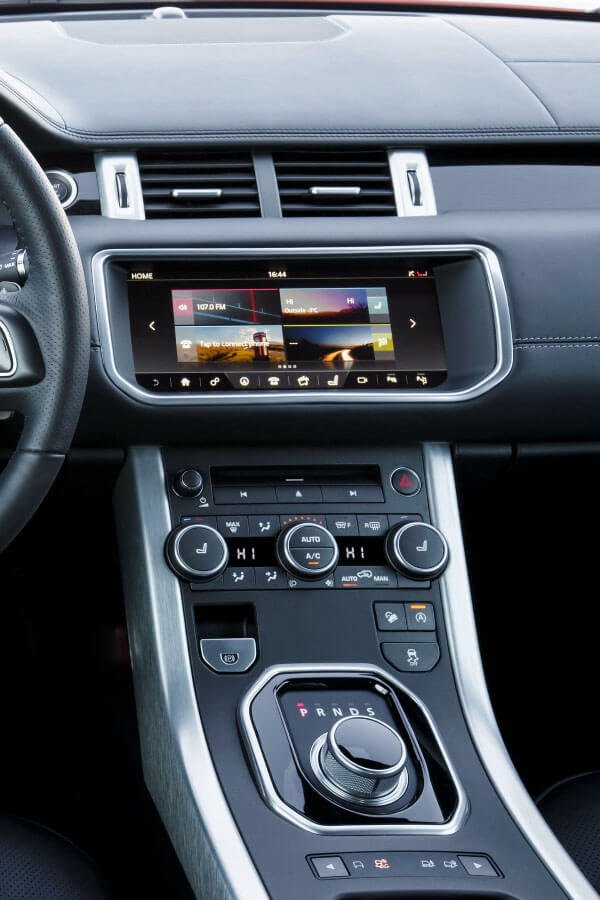
The infotainment system is a group of connected devices and software functions. The display presents information, but audio can depend on a separate amplifier. Bluetooth and phone functions can use another communication path. Cameras and parking information can be generated by separate modules and then displayed through the same screen. Vehicle menus, climate controls and settings can also share the interface.
A black screen can be caused by the display, power supply, wake signal, network communication, software, a failed upstream module or a vehicle battery condition. No sound can come from the amplifier, audio source, fibre or data network, speaker circuit, mute state or the main infotainment unit. A frozen screen can be a software symptom, but repeated resets do not prove that software is the root cause.
If the original screen, sound, cameras or vehicle menus are unstable, repair that fault before adding a retrofit. A healthy system that only lacks smartphone integration can be assessed for Range Rover Apple CarPlay installation. If the screen and audio work normally but the reverse image, parking beeps or surround view fail, the more relevant next step is parking-sensor and camera diagnosis.
Divide the cockpit into fault zones
Six infotainment zones help locate what has actually stopped working
The symptom is more useful when it is assigned to a function zone. Several zones failing together can point toward shared power, communication or a central module.
Display and touch
Blank image, backlight failure, touch inaccuracy, ghost input, lines, colour distortion or a screen that remains on after locking.
Audio and amplifier
No sound, one channel missing, crackling, distortion, low output, unexpected mute or audio that returns after a restart.
Phone and media
Bluetooth pairing, USB recognition, call microphone, music playback, device permissions and repeated connection loss.
Navigation and data
Position errors, unavailable maps, date and time faults, online services, traffic data or a navigation function that loads slowly.
Cameras and parking display
Blank reverse image, delayed camera switching, missing guidelines, surround-view faults or parking information that does not appear.
Vehicle controls and settings
Climate, seat, terrain, suspension, lighting or other vehicle menus that are accessed through the display.
The combination of working and failed features matters
Four symptom patterns that change the diagnostic route
Screen blank but audio still plays
The display, backlight, video path, connector or local power can be involved while the main system remains active. The screen should not be replaced until the video and power evidence is checked.
Screen works but no audio from any source
The amplifier, network, mute command, speaker supply or audio routing may be involved. Phone pairing and menu operation can remain normal while the audio path is offline.
Whole system repeatedly reboots
Power instability, battery condition, software, overheating, storage faults, network interruptions or a module that disrupts communication can cause repeated startup cycles.
Only one feature is unavailable
A camera, USB port, microphone, Bluetooth path or specific module can fail while the main infotainment unit remains serviceable. The repair should stay focused on that function.
Follow power and communication before parts
How the workshop diagnoses a Range Rover infotainment fault
The screen is only one endpoint. The workshop should map which functions still work, then trace the shared power, communication, software and local hardware paths before a display, amplifier or central module is replaced.
Record what works and what fails
Test display, touch, audio, phone, USB, cameras, steering controls, vehicle menus and shutdown behaviour before anything is reset.
Stabilize battery and local supplies
Check battery and charging condition, then verify fuses, grounds and local power at the affected display, amplifier, camera or interface.
Identify offline or disruptive modules
Review communication and fault records to see whether one module is missing, repeatedly resetting or interrupting several connected functions.
Inspect connectors, moisture and previous work
Check wiring, connectors, cooling, water ingress, trim damage and retrofit interfaces that can alter startup, audio routing or display switching.
Assess version and configuration only after power is stable
Use updates, resets or configuration when the platform and evidence support them. Software should not hide low voltage or damaged hardware.
Repeat the complete driver journey
After repair, test startup, menus, sound, calls, media, cameras, steering controls, shutdown and reconnection across more than one ignition cycle.
Select the repair by fault zone
Screen, amplifier, software or network repair
Display or touch route
Repair or replace the display when local power, video or data input and physical screen evidence support it. Confirm whether the display is separate from the main head unit on the exact vehicle.
Audio route
Amplifier, speaker circuit, network, audio input and mute commands should be separated. A working display does not prove the audio module is online.
Software or configuration route
Updates, resets or configuration should follow a known compatibility or software finding. They should not be presented as a universal cure for hardware, voltage or moisture damage.
Network or module route
Power, grounds, connectors and communication should be confirmed before replacing a central module. Programming or configuration needs depend on the exact platform.
Faults can look similar from the driver’s seat
Infotainment problems commonly misdiagnosed
The screen can lose backlight, local power or video while audio and the main unit remain active. The failed endpoint should be confirmed.
All speakers failing together is more likely to involve amplifier power, network, mute or audio routing than every speaker at once.
Phone permissions and software matter, but the vehicle microphone, pairing memory, module state and infotainment software also need checking.
The display can be healthy while a camera, control module, wiring or switching command fails. Test other screen functions.
A reset may temporarily restore operation without correcting low voltage, overheating, storage failure, network disruption or a damaged module.
CarPlay or another interface can complicate diagnosis when the original audio, screen or camera system is already unstable.
A repeatable repair process
From fault capture to infotainment handover
Preserve the symptom
Record video, warnings, working functions, temperature and ignition state before resets or disconnection.
Build the fault-zone map
Test screen, audio, phone, cameras and vehicle menus to identify shared and separate failures.
Trace power and communication
Check voltage, grounds, connectors, network status, moisture and previous modifications.
Repair the confirmed layer
Address the screen, amplifier, software, wiring or module supported by the evidence and exact platform.
Verify the user journey
Repeat startup, audio, calls, cameras, controls, shutdown and reconnection across several cycles.
Price depends on the fitted platform and failed function
What affects Range Rover infotainment repair cost
The scope depends on the model, infotainment generation, failed function, power and network findings, screen or amplifier access, software condition, water damage, previous retrofits, programming requirements and the part status offered. A model name alone does not identify the screen, head unit or amplifier fitted to the vehicle.
A clear quotation should state what is confirmed, which original functions are affected and which functions must remain after the repair. It should also identify whether programming, configuration, trim removal, camera testing, microphone testing or a retrofit removal is included.
- VIN, model year and infotainment platform
- Working and failed function map
- Battery, power and ground condition
- Network and fault-record findings
- Software, update and configuration history
- Moisture, connector and retrofit condition
- Part status and post-repair verification
Infotainment platforms vary by generation
The same model name can use a different screen, network and software path
Range Rover, Range Rover Sport, Evoque, Velar and Land Rover vehicles use different infotainment generations across model years and markets. Earlier systems, Touch Pro, Touch Pro Duo, Pivi and Pivi Pro do not share one universal display, amplifier, software package or repair procedure. Equipment can also vary within the same model year.
Use the VIN, screen layout and physical controls to identify the platform before ordering parts or attempting an update. Previous Apple CarPlay, Android Auto, audio, camera or screen modifications should be disclosed because they can affect power, audio routing, startup and network behaviour.
Before an update is attempted, identify the fitted platform and confirm stable battery voltage. Land Rover’s official software-update guidance explains supported update methods, but update availability does not prove that a blank screen, audio loss or repeated reboot is a software fault.
The repair is complete only when daily functions work together
What should be checked before the vehicle is collected
Startup and shutdown
The system should wake without repeated rebooting and enter normal shutdown without remaining active or contributing to battery drain.
Audio and communication
Music, navigation prompts, calls, microphone, volume and steering controls should be tested through the intended sources.
Vehicle interface
Cameras, parking display, climate, settings and original menus should remain accessible where the vehicle uses the screen for those functions.
Phone reconnection
Paired devices should reconnect as supported by the platform. A phone-specific issue should be distinguished from a vehicle fault.
Warning and network status
Relevant faults should be reviewed after the repair, not merely cleared before the vehicle is moved.
Known limitations
Any unsupported app, retained fault, previous modification or function outside the approved scope should be explained clearly.
Dubai conditions can affect electronics
Heat, dust, moisture and low voltage can change an intermittent screen fault
High cabin temperature can expose a weak display, amplifier, connector or module that operates normally when cool. Dust and previous trim work can affect cooling or connections. Water ingress from body leaks, washing or earlier repairs can damage modules and connectors away from the visible screen. Low battery voltage can create reboots and communication faults without a permanent hardware failure.
Report whether the issue appears after the vehicle sits in the sun, during a long drive, after rain or washing, after a battery replacement or only when a particular phone is connected. This context helps the workshop reproduce the fault rather than clearing it while the system is temporarily working.
Infotainment repair questions
Frequently asked questions
Why is my Range Rover infotainment screen black?
Possible causes include the display, backlight, local power, wake signal, software, network communication or an upstream module. Other working functions help narrow the fault.
Why does the infotainment system keep rebooting?
Power instability, low battery voltage, software, overheating, storage faults, network interruptions or a failing module can cause repeated restarts.
Can a weak battery cause screen and audio faults?
Yes. Low or unstable voltage can interrupt startup and module communication. Battery and charging condition should be stable before expensive module replacement.
Why is there no sound although the screen works?
The amplifier, network, audio source, mute command, wiring or speaker circuit can be involved. The display and audio paths should be tested separately.
Should CarPlay be installed to fix a faulty original screen?
Not normally. The original power, screen, audio and camera functions should be diagnosed first. A retrofit can add complexity without repairing the existing fault.
How much does Range Rover infotainment repair cost in Dubai?
The price depends on the platform, failed function, power and network findings, screen or module access, software, programming and part status. Diagnosis is needed for an accurate quotation.
Book infotainment diagnosis in Dubai
Map the failed function before replacing the screen or main unit
Send the model, year, screen photo, a video of the fault and a list of functions that still work. Include recent battery, software or retrofit history. We will advise what needs to be checked at the workshop.