

Range Rover Apple CarPlay Installation Dubai
Apple CarPlay can add iPhone navigation, calls, messages, music and compatible apps to a Range Rover or Land Rover display. The correct upgrade depends on the vehicle, model year, existing infotainment hardware and whether factory Smartphone Pack support is already present.
The correct CarPlay route starts with the vehicle
Not every Range Rover needs the same Apple CarPlay installation. A compatible vehicle may only need its existing system checked or updated, while an earlier infotainment system may need a carefully matched integration interface. Some older vehicles may require a different head-unit solution.
A model name alone is not enough to confirm compatibility. Equipment can differ by model year, market specification, infotainment generation and previous modifications. Before recommending hardware, the workshop should identify the display and control system, check existing USB and phone functions, and confirm what the owner expects from wired or wireless CarPlay.
This avoids a common mistake found across generic retrofit pages, where one product is presented as suitable for every vehicle. Compatibility must be confirmed against the actual car.
How we determine the suitable Apple CarPlay upgrade
The assessment follows the infotainment system rather than a broad promise based on the badge. The aim is to retain the vehicle functions that already work while adding the required iPhone interface through a compatible route.
Identify the installed infotainment system
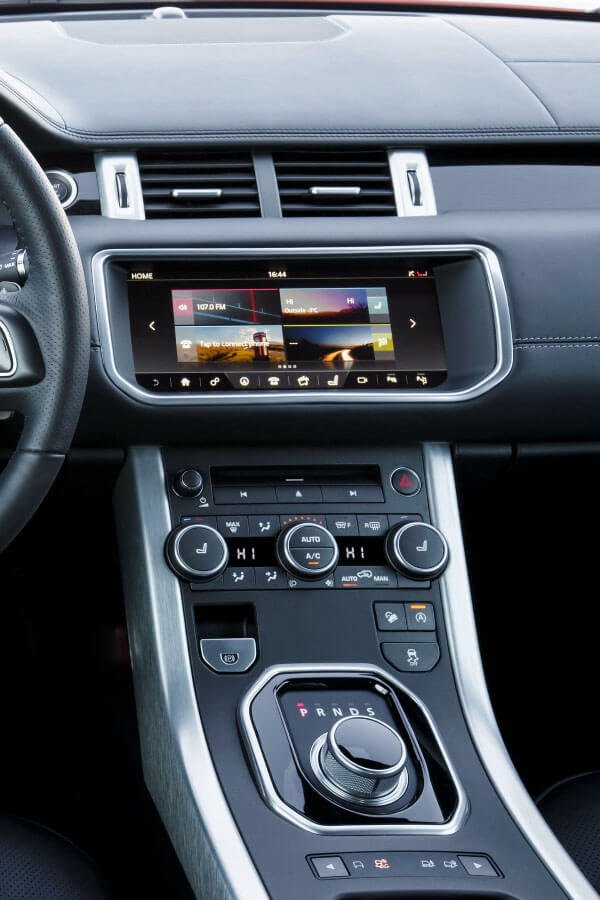
We check the vehicle details, screen layout, menu structure, physical controls, USB hardware and any previous aftermarket equipment. This helps distinguish older systems from Touch Pro, Touch Pro Duo, Pivi and Pivi Pro configurations.
Check for existing factory support
Some compatible Land Rover vehicles received Smartphone Pack support through their original system or an eligible software path. Official Land Rover guidance states that Smartphone Pack includes Apple CarPlay and Android Auto on compatible vehicles, so this possibility should be checked before adding unnecessary hardware.
Match the integration route
Where factory support is unavailable, the appropriate option may be an interface that works with the original display and controls. Earlier vehicles may need a different solution. The choice depends on compatibility, desired functions, audio route, camera behaviour and the condition of the existing system.
Install and verify the complete user journey
A successful installation is more than seeing a CarPlay logo. The workshop should test connection, sound, microphone, steering-wheel or rotary controls where supported, reverse-camera return, original vehicle menus and reconnection after the ignition is cycled.
Factory-enabled CarPlay and retrofit CarPlay are not the same
Both routes can place compatible iPhone functions on the vehicle display, but they use different hardware and have different limitations. The assessment should make this distinction clear before a quotation is prepared.
Existing factory Smartphone Pack support
A compatible original infotainment system may already support Apple CarPlay or may require an applicable software and configuration check. Connection can be wired or wireless depending on the vehicle and system. Factory availability still varies by specification.
Integration with the original display
A matched interface may add CarPlay while keeping the original screen, vehicle menus and controls. Compatibility with the camera, microphone, audio source and control method must be verified for the exact system.
Alternative solution for an earlier system
Some older vehicles cannot use the same interface as later models. A replacement or additional screen solution may be considered only after checking fit, audio integration, control retention and the owner’s preference for originality.
Software does not create missing hardware
A software update can help only where the installed platform and hardware support the required function. It should not be sold as a universal activation for every Range Rover or Land Rover.
What should remain usable after installation
Owners usually want modern phone functions without losing the features built into the vehicle. The exact retained functions depend on the chosen equipment, but they should be discussed and tested rather than assumed.
- Original vehicle menus for climate, cameras, settings and system information where they are controlled through the display
- Reverse camera and parking display with a reliable return to the original interface
- Audio playback through the intended vehicle input without severe noise, imbalance or unexpected volume changes
- Microphone performance for calls and Siri, using the selected integration route
- Steering-wheel, rotary or touch controls where the hardware supports those inputs
- Normal startup and sleep behaviour without avoidable battery drain or repeated manual resets
Retention varies between systems. If a specific control, camera view or factory function matters to you, mention it before installation so it can be included in the compatibility check.
Wired and wireless Apple CarPlay compared
Wireless operation is convenient, but it is not automatically the best route for every vehicle or owner. Signal behaviour, charging needs, phone settings and the chosen interface all affect the experience.
| Decision | Wired CarPlay | Wireless CarPlay |
|---|---|---|
| Connection | Starts through a compatible USB connection and cable. | Usually pairs through Bluetooth before transferring the active link to Wi-Fi. |
| Charging | The phone can charge from the connected port, subject to the port and cable. | A separate cable or compatible charging pad may still be needed. |
| Daily use | Requires plugging in, which can be useful on longer journeys. | Can reconnect automatically when the vehicle starts if the phone and interface behave correctly. |
| Fault isolation | A poor cable or damaged USB port is a common variable to check. | Bluetooth, Wi-Fi, pairing memory and phone permissions add more connection variables. |
| Best choice | Suitable when stable connection and charging matter more than cable-free use. | Suitable when convenience is the priority and the vehicle has a compatible wireless route. |
Installation checks that protect usability
A tidy dashboard is only one part of a good result. The system should also behave correctly during the situations the driver will use every day.
Wiring and modules should be secured away from sharp edges, heat and moving trim. Connectors should not be forced or left under tension. Where trim is removed, clips and panels should be refitted carefully to avoid rattles and poor alignment.
Questions to settle before approving the installation
The useful question is not simply whether a box can display CarPlay. The owner needs to know how the proposed system will operate in this vehicle and which original functions have been checked.
Ask the workshop to explain the route it is recommending. A clear answer should identify the existing infotainment system, whether the solution is factory-enabled or aftermarket, how audio will reach the original sound system, and how the driver will move between CarPlay and the vehicle menus.
If the vehicle has surround cameras, rear entertainment, a Meridian audio system, an aftermarket head unit or another existing modification, disclose it before the work. These details may affect compatibility or testing even when the model and year appear suitable.
A useful quotation should clarify
- The exact vehicle and infotainment system assessed
- Whether the proposed connection is wired, wireless or both
- How the original screen, controller, camera and menus will behave
- Whether the factory microphone or another microphone will be used
- Which parts and installation work are included
- What must be tested before collection
- Any known limitations for that system
When CarPlay is already fitted but does not work properly
A connection fault does not always mean the retrofit module has failed. The phone, cable, USB port, settings, audio source, microphone path, vehicle software or the interface itself may be involved. Diagnosis should start with the behaviour and the conditions under which it occurs.
CarPlay does not appear
Check whether CarPlay is allowed on the iPhone, Siri is enabled, the correct USB port is used for a wired system, and the vehicle or interface is selected in the relevant menu.
Wireless CarPlay will not reconnect
Bluetooth and Wi-Fi both matter for many wireless connections. Pairing memory, auto-join settings, multiple saved phones or an incomplete first pairing can interrupt reconnection.
Music works but calls do not
The audio source, microphone selection, call permissions and interface configuration need separate checks. Music playback alone does not prove that the full hands-free path is correct.
The display freezes or returns to the original menu
Record when it occurs, which app was active and whether the fault changes after an iPhone or vehicle restart. Firmware, power supply, cabling or interface compatibility may need inspection.
No sound from CarPlay
The vehicle may need the correct audio input selected. Volume, mute status, auxiliary routing and interface audio connections should be checked before replacing parts.
Reverse camera switching is incorrect
The camera trigger and return behaviour need verification. This is an integration issue to inspect because the camera and parking display should not be treated as decorative extras.
Apple’s own troubleshooting guidance recommends checking Siri, CarPlay restrictions, Bluetooth and Wi-Fi for wireless use, restarting the iPhone and vehicle, and forgetting then reconnecting the car. If those checks do not resolve the problem, the vehicle-side installation can be assessed.
What Apple CarPlay adds to the drive
CarPlay presents supported iPhone functions in an interface designed for use in a compatible vehicle. Available apps and features depend on the iPhone, iOS version, region, app support and the vehicle controls.
Using CarPlay after the vehicle is collected
Set up the iPhone while the vehicle is parked. Apple explains that CarPlay can be operated through a compatible vehicle’s touchscreen, rotary controller or other built-in controls, and Siri can be used for supported voice functions. The controls available in a particular Range Rover still depend on the vehicle and installation.
For a wired connection, use the intended USB port and a sound cable. If the connection becomes intermittent, test with a known-good cable before assuming the vehicle hardware has failed. For wireless CarPlay, keep Bluetooth and Wi-Fi enabled and allow the phone to join the CarPlay network automatically.
Confirm the correct iPhone permissions
Siri must be enabled for CarPlay. CarPlay must also be allowed under the iPhone’s content and privacy restrictions. Complete pairing with the vehicle parked and follow the prompts on both displays.
Keep the original interface available
Learn the control used to move between CarPlay and the factory vehicle menu. This matters when you need cameras, vehicle settings or other functions that are not part of CarPlay.
Only compatible apps appear
CarPlay does not mirror every iPhone app. Availability is controlled by Apple, the app developer, the iPhone software and regional support. Missing unsupported apps are not an installation fault.
Record the conditions before resetting
Note the phone model, iOS version, whether the connection was wired or wireless, the active app and the exact behaviour. A short video can help distinguish a connection fault from an audio or display fault.
For current setup and troubleshooting steps, see Apple’s official guidance on using CarPlay with an iPhone. Owners checking factory Smartphone Pack support can also review the official Land Rover Touch Pro software information. These references explain supported functions, but they do not confirm retrofit compatibility for an individual vehicle.
Range Rover and Land Rover compatibility needs exact confirmation
Apple CarPlay may be available through different routes across Range Rover, Range Rover Sport, Range Rover Evoque, Range Rover Velar, Discovery, Discovery Sport, Defender and earlier Land Rover vehicles. Compatibility should never be inferred only because another vehicle with the same model name has CarPlay.
Vehicle generation
The same model name can cover different dashboards, displays and infotainment platforms.
Market and specification
Factory equipment and Smartphone Pack availability can vary between vehicles and markets.
Previous modifications
An aftermarket screen, audio unit, camera or interface can change the suitable installation path.
For Android users, the separate Range Rover Android Auto page should own that search intent. This page focuses on Apple CarPlay and iPhone integration.
Apple CarPlay installation questions
Can Apple CarPlay be added to an older Range Rover?
Often there is a possible retrofit route, but it depends on the exact vehicle, original infotainment system and desired functions. An older Range Rover may need an integration interface or a different screen solution rather than factory software activation.
Can you activate CarPlay with software only?
Only when the installed infotainment platform, hardware and vehicle configuration support the relevant factory function. Software cannot create missing hardware or make an incompatible system compatible.
Will the original reverse camera still work?
Camera retention is an important compatibility and testing requirement. Whether it remains exactly as before depends on the selected system and installation route, so the camera and parking display should be checked before and after the work.
Does wireless CarPlay also charge the iPhone?
No. Wireless CarPlay handles the data connection, but the phone still needs power from a cable or compatible wireless charging pad. Charging performance depends on the vehicle equipment and device.
Why does my Range Rover CarPlay keep disconnecting?
Possible causes include the cable, USB port, Bluetooth or Wi-Fi settings, saved pairings, iPhone restrictions, firmware, power supply or the installed interface. The pattern of the disconnection helps narrow the checks.
Will a CarPlay retrofit affect the vehicle warranty?
Warranty impact cannot be promised universally. It depends on the vehicle’s warranty terms, the equipment fitted and the installation. Owners with active coverage should check the applicable terms before approving aftermarket modifications.
How much does Range Rover Apple CarPlay installation cost in Dubai?
The price depends on the infotainment system, whether factory support is available, the required interface or screen, wired or wireless operation and any existing faults. A model, year and screen photo are needed before a relevant quotation can be prepared.
Check compatibility before choosing hardware
Send the model, year and clear photos of the infotainment home screen and centre console. The workshop in Al Quoz 4, Dubai can then identify the likely system and advise what needs to be inspected before an Apple CarPlay installation or fault check.